
Which digital timers for kids work best for special needs?
- 1. Which digital timers for kids provide silent vibration alerts plus a clear large-digit countdown suitable for tactile‑sensitive children with autism?
- 2. How do I choose a visual digital timer that reduces transition anxiety for kids with ADHD who struggle to conceptually understand “ten minutes”?
- 3. Which digital timers for kids work best for multi-step task breakdowns used in special education work systems?
- 4. Which portable digital timers are rugged, spill-resistant, and battery/recharge reliable enough for heavy classroom use?
- 5. How can I program interval schedules, reinforcement cues, and simple data capture on digital timers for behavior plans without complex tech skills?
- 6. Which affordable digital timers and apps let teachers or parents export session data for IEP progress tracking and analysis?
- Concluding summary: Advantages of using the right digital timers for kids (including special needs)
Digital Timers for Kids: Which Ones Work Best for Special Needs?
Parents, therapists, and teachers increasingly rely on visual and countdown timers as time management tools for kids. Below are six in-depth, practical questions beginners often ask — each answered with actionable guidance, product-class recommendations (visual timers, classroom timers, wearable vibration alerts), and implementation tips for children with autism, ADHD, or sensory sensitivities.
1. Which digital timers for kids provide silent vibration alerts plus a clear large-digit countdown suitable for tactile‑sensitive children with autism?
Pain point: Loud beeps or harsh chimes can trigger meltdowns. Families need a timer solution that signals transitions without noise.
What to look for: Combine a visual countdown (large-digit LED or colored arc) with a silent haptic alert. Few standalone classroom visual timers include strong vibration hardware; the practical approach is to pair a dedicated visual timer (for the shared room view) with a wearable vibrating device (for the individual child). Key features:
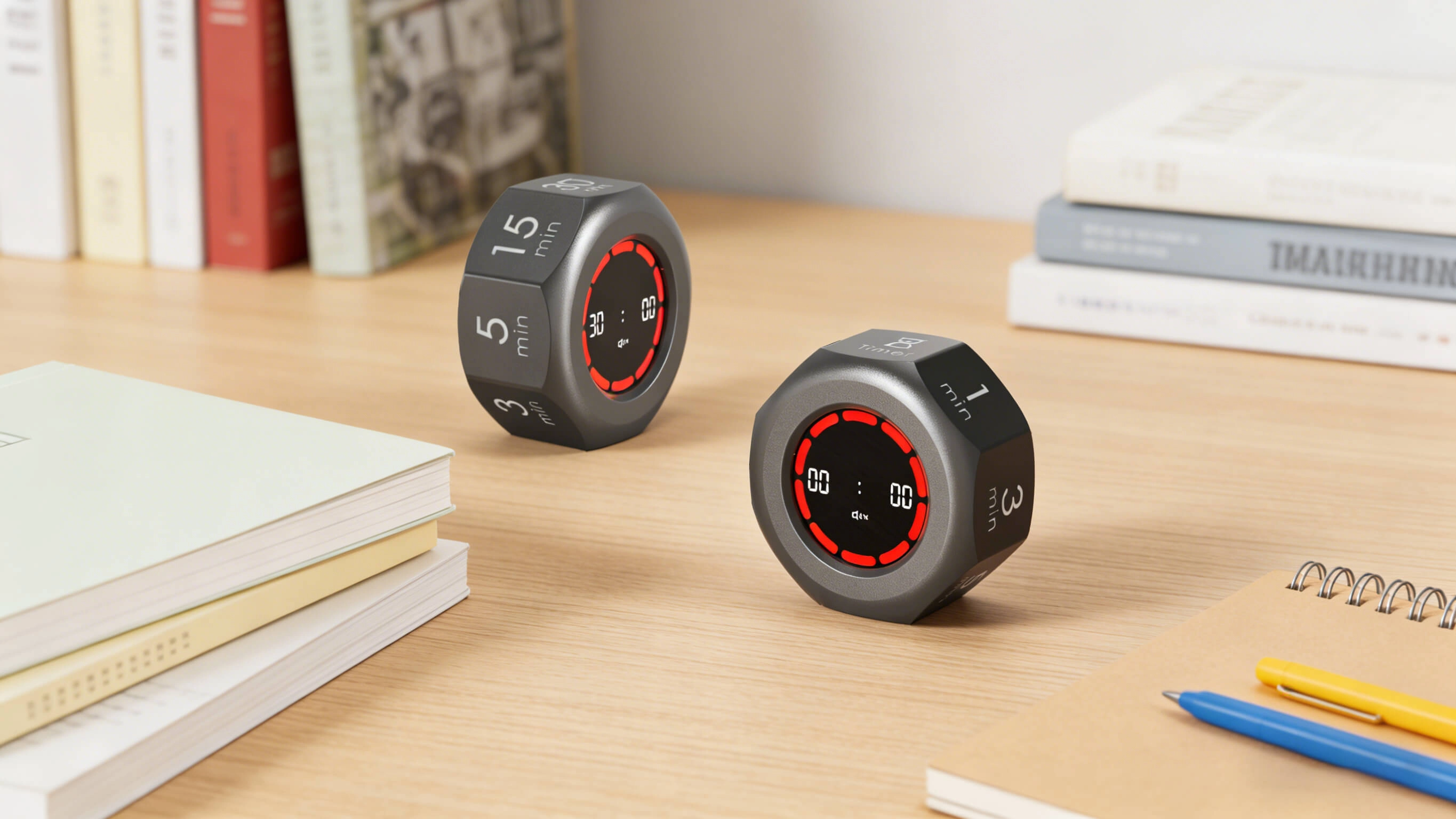
- Large-digit display & color-coded arc: Makes remaining time instantly visible from across the room (visual timers such as red-to-clear arcs are especially effective).
- Silent mode on the visual timer: Ensure the unit can mute sound so only the wearable vibrates.
- Wearable haptic alert: Small vibrating reminder watches or simple vibrating pagers (low-intensity haptics) that the child tolerates; smartwatches (Apple Watch, Android Wear) have reliable haptics but check size/complexity for age suitability.
- Easy sync workflow: A teacher/therapist starts the visual timer while the caregiver or child uses the paired vibrating device for personal cueing.
Implementation tips: Trial vibration intensity with the child in a calm setting. Use graduated exposure (start with very short, non-critical cues) and get consent before wearing devices. Document tolerance in an IEP or behavior plan so staff know which device and settings to use.
2. How do I choose a visual digital timer that reduces transition anxiety for kids with ADHD who struggle to conceptually understand “ten minutes”?
Pain point: Children with ADHD or developmental delays can’t reliably translate minute counts into expectations; numeric countdowns alone are insufficient.
Choose a timer focused on concrete visuals and chunked time rather than minute-only readouts. Important features and setup:
- Elapsed-colour arc (visual countdown): A colored disk or bar that disappears as time passes communicates how much in a glance better than numbers.
- Segmented countdowns: Ability to divide sessions into chunks (e.g., 3×10-minute segments) helps with work/rest cycles or stepwise tasks.
- Graduated cues: Use a two-stage alert (gentle blink or vibration at 1–2 minutes left, stronger cue at zero) to prepare the child for transition. Silence or low-volume chimes reduce startle.
- Consistent routines: Pair the timer with a visual schedule card or picture exchange — when the timer shows the blue arc, that equals “play”; when red, time to tidy up.
Practical setup: Start with short practice transitions (2–3 minutes) to build the child's internal sense of time. Gradually increase the session lengths while keeping the visual arc and a picture schedule in view. This stepwise exposure is supported by classroom practice and special education guidance emphasizing visual supports for time comprehension.
3. Which digital timers for kids work best for multi-step task breakdowns used in special education work systems?
Pain point: Teachers need timers that support sequential tasks (task 1 → timer → cue for task 2) and help children learn one-step-at-a-time independence.
Look for timers or ecosystems that support activity sequencing, simple macros, or linked timers. Options and workflows:
- Timers with preset program slots: Units that let you store multiple countdown profiles (e.g., 5 min, 10 min, 3×5-min intervals) are useful for repeating multi-step lesson plans.
- Multiple linked timers or split-screen features: Some classroom countdown timers display two simultaneous timers (work time + break time) to manage alternating activities.
- Physical cue integration: Combine the timer with laminated task cards or a visual work system: when timer 1 ends, remove card 1 and place card 2 in view.
- Low-tech fallback: Use a sequence chart with a standard visual timer. This is resilient and easy for paraprofessionals to implement without advanced training.
Teacher tip: Save common sequences as labeled presets and train support staff on one consistent naming system (e.g., “Morning Routine 1,” “ABA Task Block”) so the environment remains predictable for the child.
4. Which portable digital timers are rugged, spill-resistant, and battery/recharge reliable enough for heavy classroom use?
Pain point: Classroom devices get dropped, spilled on, or left on the floor. Low-cost timers may fail quickly, creating disruptions.
Durability features to prioritize:
- Sturdy ABS or rubberized casing: Shock-absorbing bumpers or silicone shells survive drops better than thin plastic.
- Water/splash resistance: Look for IPX ratings for splash resistance if you expect liquid exposure (classroom snack areas). If a device doesn’t list IP protection, assume standard splash vulnerability.
- Battery vs rechargeable: Rechargeable lithium units with USB-C charging reduce ongoing battery purchases; replaceable AA batteries are easier to swap during the day. Consider classroom logistics (lockable charging station vs accessible battery drawer).
- Mounting options: Wall/desk mounting brackets and strong magnets reduce accidental drops and give a fixed reference point for students.
Procurement checklist: Ask suppliers for classroom warranty terms and bulk discounts. Request sample units for pilot classrooms to check tolerability (size, weight, visibility) before a full purchase.
5. How can I program interval schedules, reinforcement cues, and simple data capture on digital timers for behavior plans without complex tech skills?
Pain point: Teachers and parents need to implement reinforcement schedules (e.g., fixed-interval token delivery) but cannot navigate complicated software.
Easy, low-tech to mid-tech strategies that work in real classrooms:
- Use timers with multi-interval or countdown-repeat modes: Many classroom timers support “repeat” or “cycle” modes useful for token economies and interval reinforcement; these can be set in three or four button presses on most units.
- Pair timers with token boards: When the timer ends, give a token. This minimizes the need for recorded timestamps while maintaining consistent reinforcement scheduling.
- Data capture without advanced apps: For basic tracking, use a simple paper record (start/stop time columns) or a spreadsheet on a tablet. If you prefer digital logging, choose companion apps that explicitly advertise CSV/export features and simple one-button start/stop logging.
- Training and templates: Provide paraprofessionals a laminated one-page protocol: preset name, interval length, reinforcement type, and simple counting sheet. This reduces implementation errors.
Note on privacy: If a timer device syncs to an app with cloud backup, confirm the app’s privacy policy meets your school district’s data-protection rules before logging student data.
6. Which affordable digital timers and apps let teachers or parents export session data for IEP progress tracking and analysis?
Pain point: Special education teams need objective duration data to demonstrate progress on IEP goals, but not all hardware supports exportable logs.
Reality check: Many low-cost visual timers are single-purpose and do not log data. If you require exportable session data, target solutions that explicitly provide connectivity or companion apps. Practical options:
- Use a connected timer system: Look for timers with Bluetooth/USB and an accompanying app that lists data export (CSV or spreadsheet) as a feature in product specs. Confirm the export workflow in a product demo.
- Alternate workflow—manual but robust: Use a classroom tablet or smartphone app designed for session logging (many behavior-tracking apps allow one-button start/stop and export). Start the visible countdown on the classroom timer while recording session start/stop in the app for each student.
- Documentation practice: Create a template in your district’s preferred format (duration, prompts, independence level) and have staff enter exported CSVs from apps or manually input short logs weekly for IEP meetings.
Procurement tip: When purchasing, ask vendors for a vendor data sheet and a live demo showing the export process. If the vendor cannot demonstrate export, plan for a hybrid workflow (visual timer + separate logging app).
Concluding summary: Advantages of using the right digital timers for kids (including special needs)
Well-chosen digital timers and visual countdown tools reduce transition anxiety, increase independence, and support consistent reinforcement across home, therapy, and classroom settings. Key advantages include clearer time comprehension via visual arcs and segmented intervals, customizable sensory cues (silent, vibration, low-volume tones), durable classroom-appropriate designs, and workflows that integrate with simple data-capture methods for IEP documentation. Pair visual timers with wearable haptics when silent individualized cues are necessary, and prioritize devices or companion apps that support easy presets and, when required, simple exportable logs.
For procurement, ask suppliers for sample units, classroom warranty terms, explicit statements about splash resistance or mounting options, and demonstrations of any logging/export features. If you need help selecting the right visual timers, classroom timers, wearable vibration alerts, or a hybrid solution tailored to children with autism or ADHD, contact us for a quote at www.youbenlife.com or email info@youbenlife.com.
Contacts
Sofia
WhatsApp/Phone
All
Do you offer OEM & ODM clock services?
Yes, we provide both OEM & ODM solutions, allowing clients to customize clock design, materials, packaging, and branding.
What types of clocks can you manufacture?
We manufacture a wide range of clocks, including wall clocks, desk clocks, digital clocks, and smart clocks.
Can I customize the clock design and logo?
Absolutely. We offer customization for clock appearance, structure, materials, and logo printing to perfectly match your brand.
What is the minimum order quantity (MOQ)?
Our standard MOQ varies depending on the model, usually starting from 200–500 pieces. Custom designs may require different quantities.
How do you ensure product quality?
All clocks undergo strict quality control, including time accuracy tests, durability checks, and packaging inspections before shipment.
Interested in this article?
Let’s talk.
Need specifications, pricing, or customization options? We’ll provide everything you need.
By clicking “Submit,” you agree to share your information with our authorized team to process your request.
Your data will only be used for necessary communication and support.

Youben life
Youben life